New rent from a month on
Change the rent from a month you pick. Earlier bills stay as they were.
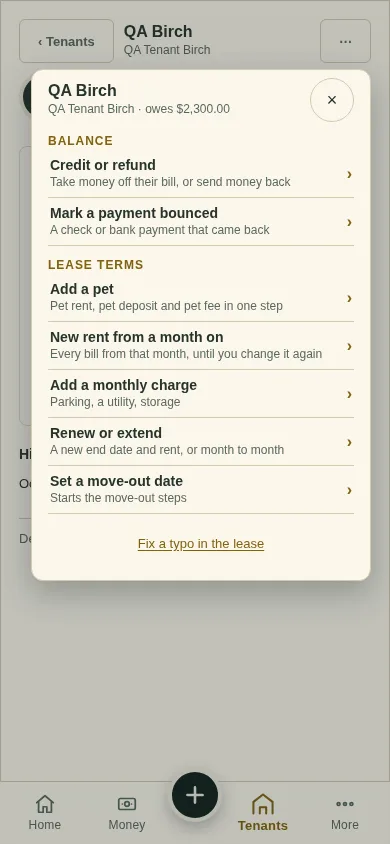
All changes start from the lease page: open the lease from Tenants and tap ⋯ (top right). Earlier bills never change.
Tap ⋯, then New rent from a month on.
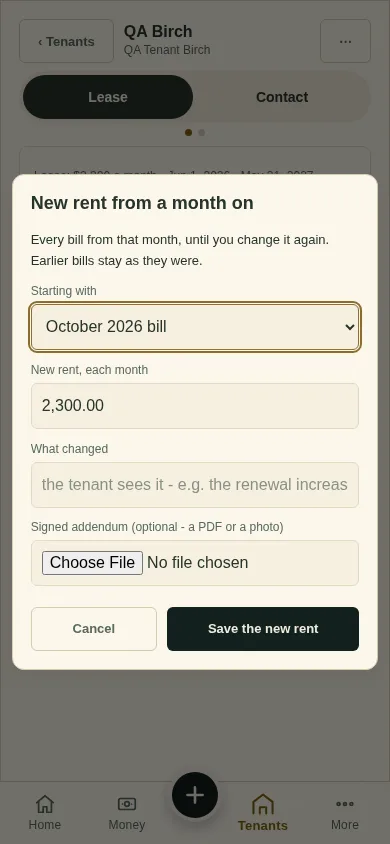
Pick the month under Starting with and type the New rent, each month.
Say What changed (your tenant sees it), and attach the signed addendum if you have one.
Tap Save the new rent.
What you'll see
Every bill from that month uses the new rent, until you change it again. The lease page lists it under Lease changes.
Next
Add a pet
Can't find it? Ask Moolah in the app, or write to hello@thepropertyledger.app.