Past statements
Open a tenant's statement for any earlier month, the same one they see on the portal.
Open the tenant from Tenants. On a phone, tap ⋯, then Lease, then Statement. On a computer, it is on the Lease tab.
Scroll to Past statements: each month, newest first, with its balance at the end, for example "Balance $0 · Paid in full". All statements shows the older ones.
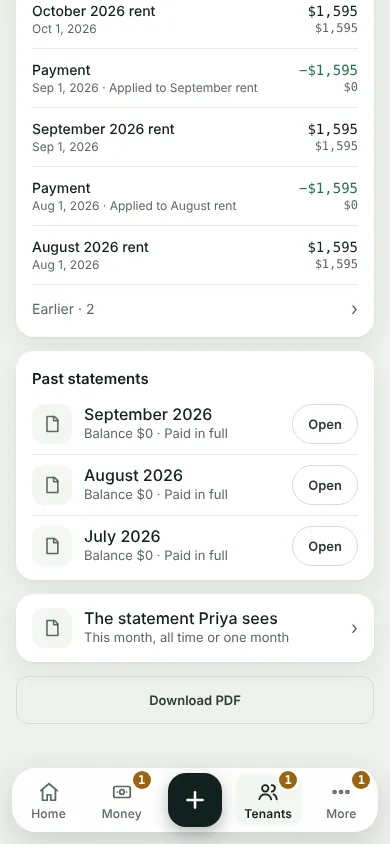
Tap Open on a month. Full size shows it as a page, and Download saves it.
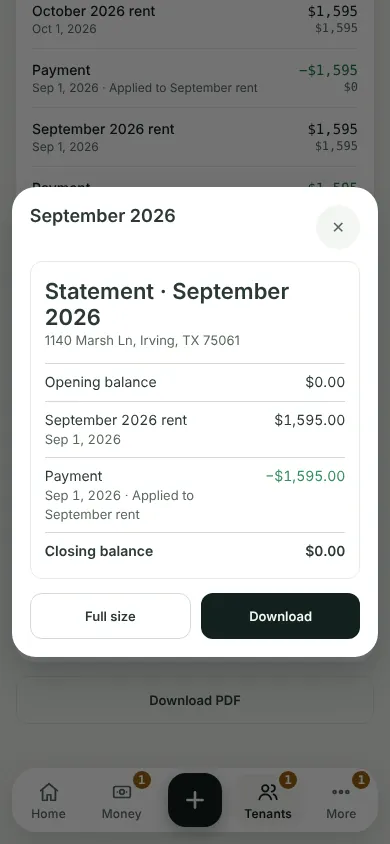
What you'll see
The month only: its opening balance, its bills and payments, and its closing balance. Your tenant has the same list under Statement on the portal.
Next
When a tenant says "I've paid"
Can't find it? Ask Moolah in the app, or write to hello@thepropertyledger.app.