Repairs
See what your tenants reported, give it to someone, and mark it fixed.
Go to Repairs. On a phone it is under More. Reports from the tenant portal arrive as New, with their photos.
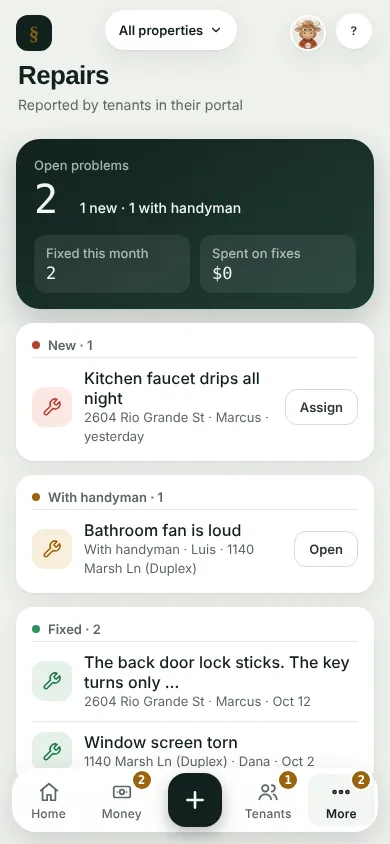
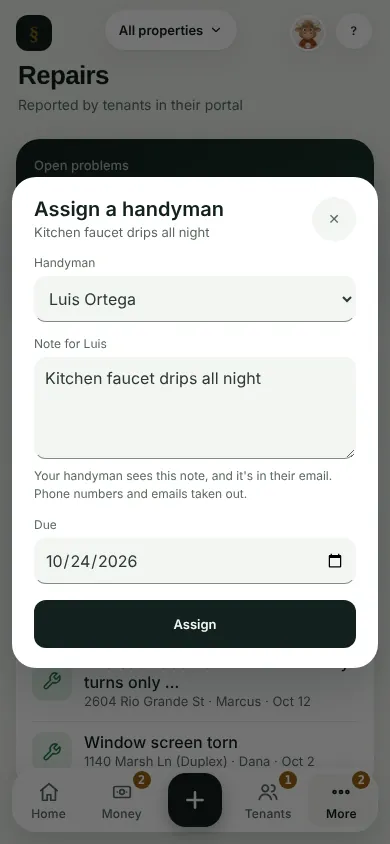
Tap Assign on a new report. With a handyman, pick them, add a note and a due date, and tap Assign: it moves to With handyman. Without one, say Who's fixing it? in the report and tap Save schedule.
When it is done, tap Mark fixed. The report closes and your tenant gets an email.
A handyman can have their own sign-in, and see only the jobs you give them. See the Handymen guide.
What you'll see
Open problems, what was fixed this month, and what you spent on fixes.
Next
Snap a receipt
Can't find it? Ask Moolah in the app, or write to hello@thepropertyledger.app.