Payment plans
Split what a tenant owes into up to four payments, on your terms.
Once a tenant owes a full month's rent, their page and their row on Tenants offer Set up a plan. Or open the tenant, tap ⋯, then Set up a payment plan.
Fill in each payment: a date and an amount, up to four. Left to place counts down to what is owed.
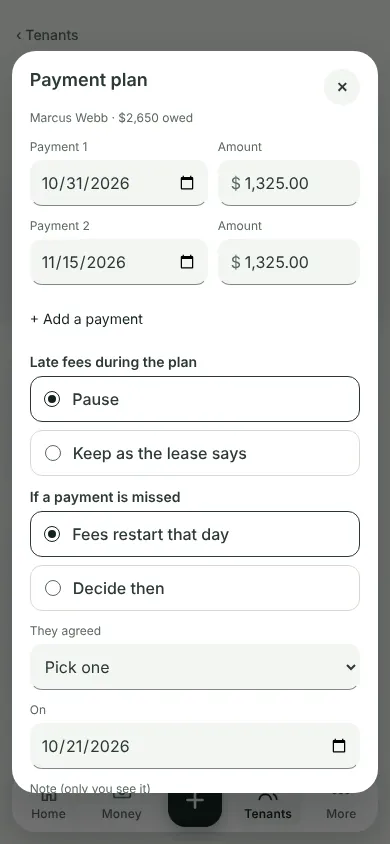
Pick Late fees during the plan (Pause, or Keep as the lease says) and If a payment is missed (Fees restart that day, or Decide then). Say how they agreed, and tap Set up plan.
A payment missed? "Plan payment missed" shows on the tenant's page the day after. Tap Decide: Give 7 more days, End the plan, or leave it and remind them.
Rent for a new month is still due as the lease says.
What you'll see
The Payment plan card on the tenant's page: each payment, what is paid, and If one is missed.
Can't find it? Ask Moolah in the app, or write to hello@thepropertyledger.app.